Nullzeit
Nullzeit Manual
Mirror of the Nullzeit in-app Manual page — generated from the app sources (
swift run generate-manual), published for reading on the phone via the QR code on the watch. ← nullzeit home
Read me first
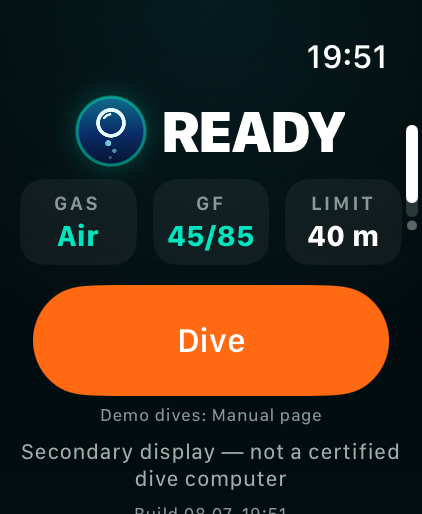
Pre-dive READY screen — the disclaimer is always visible.
Nullzeit is a SECONDARY DISPLAY, not a certified dive computer (no EN 13319, no redundancy). Always dive with an independent, certified dive computer and follow it and your training. If the two displays disagree, the certified computer wins — every time. Test each build with a demo dive (“Try it on land”, below) on land before taking it near water.
Get it on your wrist
Press DIVE on the READY screen before entering the water — that is the deterministic path: the depth sensor and the background session are armed, and Water Lock engages the moment you submerge. Automatic starts and the watch-face complication are conveniences around that one habit.
| Term | Meaning |
|---|---|
| First start | On its first launch Nullzeit asks for the depth-sensor permission and offers the Auto-Launch setup — on dry land, because the permission dialog cannot be answered once Water Lock owns the screen. |
| DIVE button | Arms the dive before you enter the water. After opening, the app stays in front for 30 minutes — enough preparation time. Leave the Digital Crown alone once armed: unlocking Water Lock ends the background session. |
| Auto-start (app in front) | If Nullzeit is on screen when you submerge below 1 m, the dive starts by itself — the watch hands the app a dive session automatically. |
| Auto-Launch (app closed) | Which dive app opens on submersion is a watch setting: Settings → General → Auto-Launch → When Submerged. Select Nullzeit there — otherwise Apple’s Depth app takes the dive. Developer-installed builds can be missing from that list (a known watchOS bug); then always start the dive from the app before entering the water. |
| One dive session only | The watch runs a single dive session at a time. Whichever app starts it owns the dive; Nullzeit and the Depth app never run one simultaneously. |
| Session ended mid-dive | If the watch kills the depth session while the workout net still carries the app, Nullzeit re-arms silently (the event goes to the diagnostics log). A red message appears only when the underwater runtime is actually lost — then keep Nullzeit in front, or reopen it. |
| Health permission | The first DIVE start asks for Health workout access: the dive keeps the app alive underwater as an open-water swim workout session. The session itself writes nothing to Health — only an explicit dive export does. |
| Ending a dive | Surfacing ends the dive by itself: a teal “DIVE ENDING IN n s” countdown runs the 60-second grace period, then the log page appears, the background sessions end and the armed state clears — no button needed. Briefly breaking the surface (wave chop, a quick look around) does not end or split the dive; re-submerging during the countdown just continues it. The next dive starts with DIVE again (or automatically if you re-submerge); tissue loading carries over. Cancel exists only for an armed dive that never went below 1 m. |
Try it on land
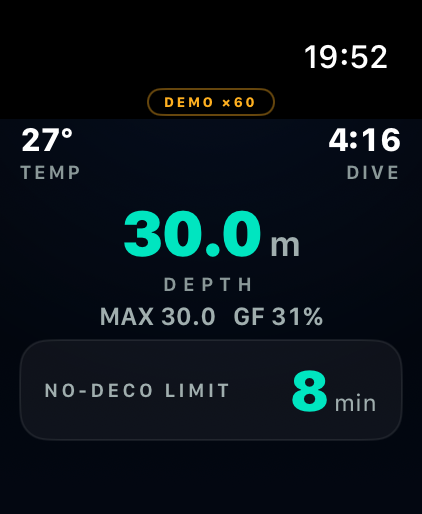
A demo dive — the DEMO badge stays visible throughout.
Both demos run on a separate, sandboxed model — your real tissue state, logbook and recovery snapshot stay untouched, guaranteed. The display is the production dive screen, and the vibrations are real: learning the haptic vocabulary is the point. Never start a demo in the water.
| Term | Meaning |
|---|---|
| Interactive demo | You are the depth profile: the Digital Crown sets the depth, and time runs at ×60 (1 s of real time = 1 min of dive time). Turning the crown up n metres within one second ascends at n m/min — provoke the NDL warning, deco, a stop violation, SLOW, the sensor limit, the safety stop, then hold 0 m to surface and see the log and no-fly. Demos always use the full 40 m sensor limit, whatever this watch’s entitlement tier reports on a live dive. |
| Guided demo | Hands-free autoplay of a complete deco dive (30 m, stops, safety band, log) — the walkthrough mode for a dive-school briefing. |
| TAP ⇄ TISSUES | Tap the demo screen to flip between the dive display and the Tissues page — watch the compartment bars load and clear live while the profile runs. Demo-only: in the water the touchscreen stays locked. |
| DEMO ×60 badge | Always visible during a demo, so a demo screen can never be mistaken for a live dive. Demo sessions have no DIVE button. |
Why a dive computer at all
Breathing compressed gas under pressure dissolves nitrogen into your tissues. Surface too fast and it comes back out as bubbles — decompression sickness. A dive computer tracks the one thing you cannot feel: how much nitrogen you have taken up, and how fast you are allowed to give it back.
| Term | Meaning |
|---|---|
| Uptake | The deeper and the longer you dive, the more nitrogen dissolves — fast tissues (blood, brain) load within minutes, slow ones (joints, fat) over hours. |
| NDL | Inside the no-decompression limit you may still ascend straight to the surface at a safe rate. The display counts it down live. |
| Deco stops | Overstay the NDL and the direct way up is closed: scheduled stops on the way let loaded tissues off-gas before the ambient pressure drops further. |
| From tables to computers | Printed tables had to assume one rectangular dive to maximum depth. A computer re-computes continuously from the profile you actually dive — that is the whole trick, and why it has to be trustworthy. |
The model, in one breath
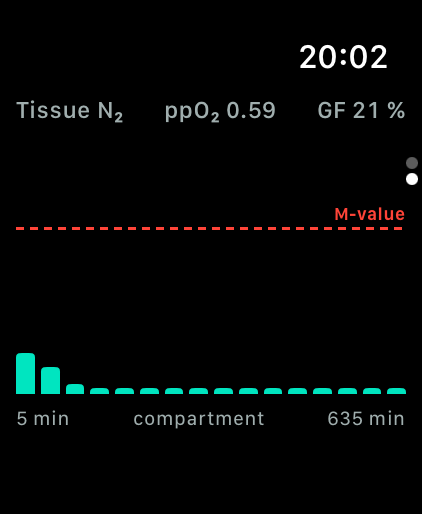
The Tissues page: compartment loading against the M-value line.
Bühlmann ZH-L16C with gradient factors (Erik Baker): 16 theoretical nitrogen compartments load and unload exponentially; the display warns when the most loaded one approaches its tolerated limit. Like every dive computer, it assumes average body conditions — cold, exertion, dehydration and personal physiology are not measured; dive conservatively when they apply.
The six pages
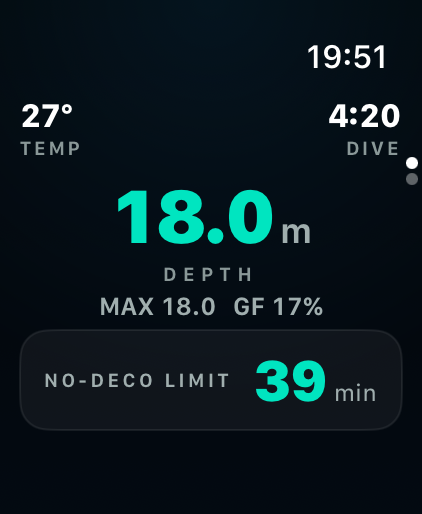
Page 1, the dive display: depth rules the screen.
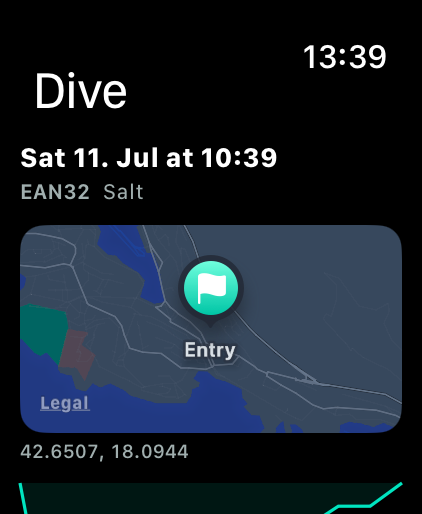
Page 3, a logbook dive's detail: a map of where you entered the water.
Turn the Digital Crown to change pages. Underwater the touchscreen is water-locked; everything is readable by glance, nothing needs a tap. The ring shows only pages that currently mean something: while diving (armed or submerged) it is Dive and Tissues; at the surface, Settings, the Planner and Manual are always there, the Logbook joins once it holds a dive, and Tissues stays visible while your tissues carry loading from a dive.
| Term | Meaning |
|---|---|
| 1 · Dive | The main display: depth, time, and the one operative instruction (NDL, stop, or a directive). |
| 2 · Tissues | 16 bars, one per tissue compartment (fast → slow), each as % of its surface M-value. Long bars = loaded tissue. The header shows the live GF and ppO₂; below it the oxygen clock (CNS and OTU). |
| 3 · Logbook | Saved dives, newest first. Tap a dive to open its detail — a map of the entry point (when a GPS fix was captured), the depth profile and every stat, with Health and UDDF exports. Swipe a dive left to delete it; swipe right to save it to Apple Health or share it as a UDDF file. |
| 4 · Planner | Surface-only no-deco planner: the no-stop time at a range of depths from your current tissue loading. Scroll the depths with the Digital Crown. No-deco time only — never a deco schedule. |
| 5 · Settings | Gas, gradient factors, water type, altitude, mode (Computer/Gauge). Surface only — locked during the dive. |
| 6 · Manual | This reference: a QR code that opens this manual on your phone, the demo dives under “Try it”, and “Read manual” — the whole manual as one scrollable page. |
Planner
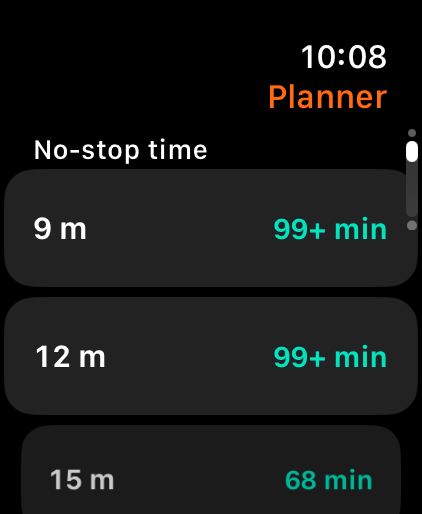
The surface planner: no-stop time by depth, from your current tissue loading.
The Planner (crown page 4, at the surface) answers one question before you get wet: how much no-stop time do I have at each depth, right now? It plans from your live tissue loading, so on a repetitive dive the times are already shortened — exactly as your dive would be. Scroll the depth list with the Digital Crown. It is a planning aid only: your certified computer still leads the dive.
| Term | Meaning |
|---|---|
| No-stop time only | The Planner shows no-decompression time per depth — it never builds a decompression schedule (stop depths and times). Planning a deco profile needs a bottom time this table does not have, so it is deliberately left out rather than approximated. |
| no limit | A depth so shallow that no practical no-stop limit exists under your current loading — an honest label, not a made-up number. Deeper rows show real minutes (floored, capped at 99+, like the dive display). |
| in deco | At that depth, with your current tissue loading, you would already be past your no-stop time — a direct ascent would no longer be allowed. Shown in amber, never as a fake positive number. |
| PAST MOD (planner) | The depth is deeper than the configured gas’s MOD (oxygen-toxicity limit). The row stays in the table with its no-stop time, flagged amber — the Planner never hides or clamps a depth, it warns. |
| Planner in Gauge mode | Gauge mode withholds all deco guidance, so the Planner withholds the no-stop table too — the same honesty rule as the dive display. Switch to Computer mode to plan, or plan by tables. |
Dive display, top to bottom
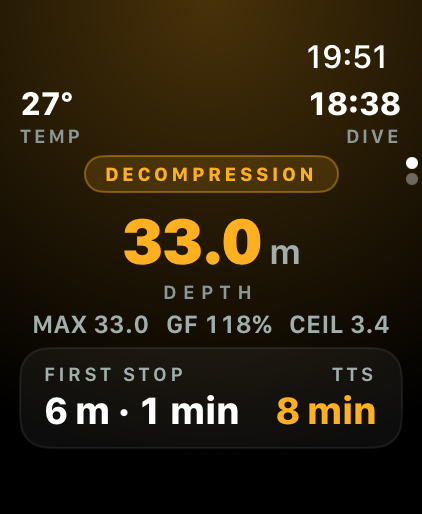
All elements populated: a dive in decompression.
| Term | Meaning |
|---|---|
| TEMP · DIVE | Water temperature (°C) and time since submerging (m:ss). On nitrox, a GAS column joins them — on air it stays out of the way. |
| DEPTH | Current depth in metres — the biggest number on screen, and the one that rules. |
| ▲ / ▼ n | Vertical speed in m/min (▲ ascending, ▼ descending). Green ≤ 9, amber near 10, red above 12. |
| MAX | Deepest point of this dive (m). |
| GF n % | Live surfacing gradient factor: how close the most loaded tissue would be to its Bühlmann limit if you surfaced now. 100 % = on the raw limit. |
| CEIL | Direct-ascent ceiling (m), shown only in deco: do not ascend shallower than this right now. |
| Operative card | Exactly one instruction at a time: the NDL countdown, or the first deco stop, or a red directive — never two at once. |
| GAUGE (badge) | Gauge mode is active: the display shows only measured values (depth, runtime, max depth, ascent rate) and withholds all deco guidance — NDL, stops, TTS and GF are hidden, not computed away. Plan the dive by tables or a certified computer. Entered by choice (Settings → Mode) or automatically after a degraded recovery. |
Screens and colours
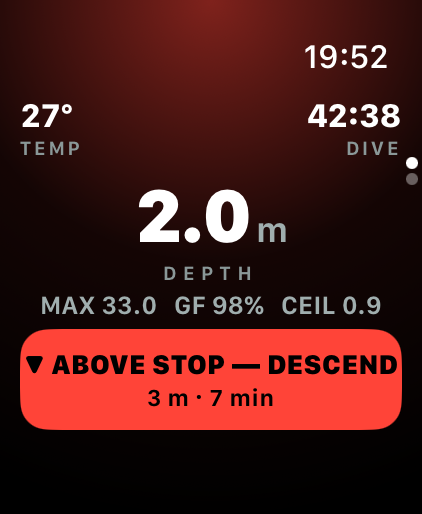
A stop violation: the red directive names the action.
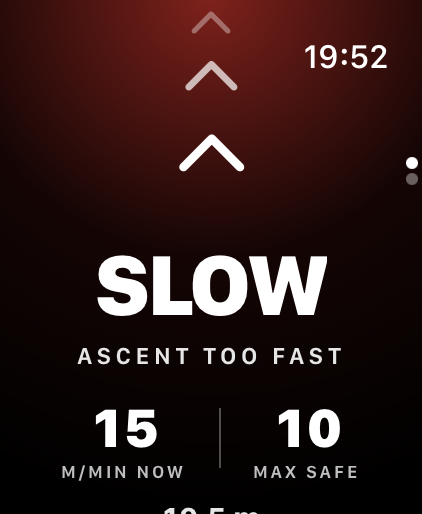
Ascending too fast: SLOW with the live rate against the safe maximum.
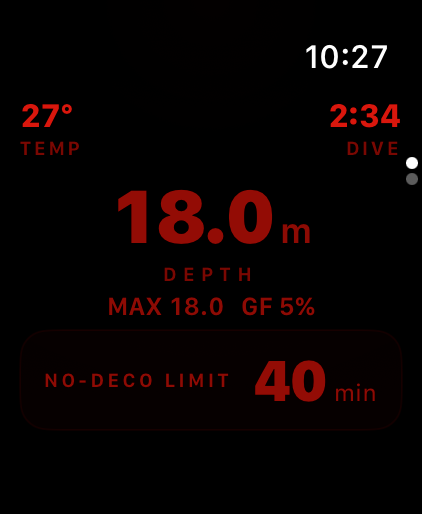
Night mode: a dim red palette that keeps your dark adaptation.
Colour is never the only signal — every state also changes its text. Teal = fine, amber = caution, red = act now. The background tints with depth and floods amber/red with severity. Night mode (Settings) drops colour altogether for a dark-adaptation-friendly dim red display — then the text and vibrations are the whole signal, which is exactly why they always carry it.
| Term | Meaning |
|---|---|
| READY | At the surface, before a dive: gas, sensor limit and battery, plus the DIVE button (demo dives live on the Manual page). The teal GAS cell opens its setting directly; LIMIT is the sensor’s statement, not a choice. Gradient factors and the rest live in Settings, not on this row — they change rarely. Notices (restored tissue state, no-fly, low battery) appear here. |
| Teal depth | Inside the NDL, comfortably. Nothing to do but enjoy. |
| ▲ ASCEND SOON (amber) | NDL at or below 5 min: begin the ascent soon or accept a deco obligation. |
| DECOMPRESSION (amber badge) | Direct ascent no longer allowed. The card shows the first stop (depth · minutes) and TTS. Ascend to the stop, never above it. |
| ▼ ABOVE STOP — DESCEND (red) | You are shallower than a mandatory stop: descend below the stop depth immediately. Pulsing red background, repeating strong buzz. |
| SLOW — ASCENT TOO FAST | Ascending faster than 12 m/min. Full-screen takeover: slow down until it disappears (target ≤ 10 m/min). |
| PAST x m SENSOR LIMIT — ASCEND (red) | At/past the sensor’s maximum depth: depth data may be unreliable from here — ascend. A red warning line at the bottom of the dive display with a pulsing red background and a repeating strong buzz; the dive data itself (depth, stops, TTS) stays visible, flagged rather than hidden. Warned in amber from 90 % of the limit (“NEAR x m SENSOR LIMIT”). |
| SURFACED — DIVE ENDING IN n s | You have broken the surface and the dive is winding down: a calm teal countdown runs the wave-chop grace period (about a minute). Re-submerge within it — a quick look around, wave chop — and the same dive simply continues. Let it reach zero and the dive is logged and the surface screen takes over. This is the normal end of a dive, not a fault: the sensor stops sending readings above water by design. |
| NO DATA (red) | The depth sensor stopped delivering readings while you were still genuinely submerged — not the same as surfacing (that shows the SURFACED countdown). Every value on screen is frozen, not live — treat it as unreliable and consult a backup gauge or computer. Clears the moment a fresh reading arrives. |
| SAFETY STOP ring | Advisory 3-min hold at 5 m after dives beyond 10 m. The ring shows the countdown and your live depth — hold it near 5 m. A mandatory deco stop always wins the screen; after a deco dive the countdown starts once the last mandatory stop is cleared (do the safety stop anyway — recommended practice). Success buzz when done. |
| Dive Log | After surfacing: profile sparkline, max depth, dive time, min temperature, end GF, running surface interval, and the no-fly estimate. Open the Logbook page for past dives — tap one to see its full detail, including a map of where you entered the water. |
Vibrations
Three levels, matching the colours:
| Term | Meaning |
|---|---|
| Single tap | Caution: NDL warning reached, approaching the sensor depth limit, the CNS oxygen clock crossed 80 %, or the battery has dropped below 20 % while diving. |
| Distinct prompt | State change into mandatory decompression. |
| Strong, repeating buzz | Act now — above a mandatory stop, ascending too fast, past the sensor limit, past the gas’s MOD, the CNS oxygen clock at 100 %, the depth sensor has gone silent (NO DATA), or the battery has dropped below 10 % while diving (BATTERY CRITICAL). It repeats until the situation is corrected. |
| Success pattern | Safety stop completed — clear to surface (advisory). |
Warnings and honesty
A visible failure beats a plausible wrong number. These lines can appear at the bottom of the dive display or on READY:
| Term | Meaning |
|---|---|
| Plan truncated — do not trust | The deco plan could not be computed to the end. Treat displayed values as broken; dive your certified computer. |
| n sensor readings dropped | Invalid sensor samples were rejected (they never touch the model). A handful is normal noise; many = scrutinize the whole profile. |
| PAST MOD x m — ppO₂ HIGH | Deeper than the configured gas’s MOD: oxygen toxicity risk. Ascend above the MOD. |
| CNS x % — ASCEND | The cumulative oxygen clock has crossed 80 % of the NOAA limit (amber; red “CNS LIMIT” at 100 %, with a repeating buzz). Ascend to shallower depth — the clock only recovers where the oxygen partial pressure is low — and end the exposure. Especially relevant on repetitive nitrox days: MOD alone does not see the accumulated dose. |
| Tissue loading restored… | The app was restarted and resumed the saved tissue state, off-gassed across the gap. Normal after closing the app between dives. |
| Restored after an interrupted dive — estimate degraded | The app went down mid-dive; the gap was bridged conservatively by assumption. Trust only the certified computer for the rest of the day. |
| Depth sensor fault | The watch itself flagged its depth reading as unreliable. The display can no longer be trusted for this dive. |
| BAT (GOOD / LOW / CRIT) | Pre-dive battery cell on the READY screen, next to GAS/LIMIT: GOOD at 80 % or more (the recommended charge before a dive), LOW below that, CRIT below 20 %. A standalone instrument that runs out of power loses the whole display, not just a convenience feature — charge to GOOD before entering the water. |
| LOW BATTERY x% | Watch battery below 20 % while diving — advisory. Start planning the ascent with margin. |
| BATTERY CRITICAL x% | Watch battery below 10 % while diving — surface while there is still power to do so. Repeats every minute until you recharge. |
Abbreviations
| Term | Meaning |
|---|---|
| NDL | No-Decompression Limit: minutes you can stay at this depth and still ascend straight to the surface. Displayed floored (5.9 shows 5), capped at 99+. |
| GF (settings) | Gradient Factors low/high (e.g. 45/85): how far into the Bühlmann tolerance the plan may go — at the deepest stop (low) and at the surface (high). Smaller = more conservative = longer stops. |
| TTS | Time To Surface: minutes for the full ascent including all deco stops. |
| FIRST STOP | Deepest mandatory deco stop, as depth · minutes. This is the floor that must not be crossed while it shows. |
| MOD | Maximum Operating Depth of the gas: deeper than this, oxygen partial pressure exceeds 1.4 bar (toxicity risk). Each gas row in Settings shows its MOD. |
| EAN | Enriched Air Nitrox; EAN32 = 32 % oxygen. More O₂ = longer NDL but shallower MOD. |
| ppO₂ | Oxygen partial pressure in bar. Recreational working limit: 1.4. |
| CNS | Central-nervous-system oxygen toxicity, as % of the NOAA exposure limit. Accumulates whenever ppO₂ exceeds 0.5 bar (faster the higher it is), recovers at the surface with a 90-minute half-time, and carries across repetitive dives. Amber at 80 %, red with a repeating buzz at 100 %. |
| OTU | Oxygen Toxicity Units — the whole-body (pulmonary) oxygen dose of the dive day, shown against the NOAA single-day allowance of 300. Resets once the tissues are fully rested (a new dive day). Informational: CNS is the guarded limit. |
| LIMIT | The depth sensor’s maximum operating depth (40 m on this hardware/entitlement). Beyond it the watch’s depth data is unreliable. |
| NO FLY | Model estimate of the wait before flying (0.75 bar cabin). Read as “at least”: DAN guidelines (12 h after one no-deco dive, 18 h after repetitive dives) apply independently. |
| END GF | Surfacing gradient factor at the moment you left the water — the log’s “how close was that” number. |
| SURFACE INTERVAL | Time since surfacing. Tissues keep off-gassing in the model, so a repetitive dive starts correctly pre-loaded. |
| UDDF | Universal Dive Data Format — the open XML interchange format desktop logbooks (e.g. Subsurface) and dive-log websites read. Swipe a logbook dive right to share it as a .uddf file from the watch. The file carries the depth and temperature profile, gas, water density, and — when the watch got a GPS fix while you armed the dive — the position where you entered the water. The first Live start asks for location permission; declining it just means your dives carry no position. |
| QR code | At the top of the Manual page: point the iPhone camera at it to open this manual in the browser — for comfortable reading on a bigger screen. Needs internet on the phone; the watch itself never does. |
Settings, explained
| Term | Meaning |
|---|---|
| Gas | Air or nitrox preset. Changing gas keeps your tissue loading — safe to switch between repetitive dives. Check the MOD shown per gas. |
| Gradient factors | 30/70 conservative → 50/95 aggressive. When in doubt, keep 45/85 or ask your instructor. Lower numbers = earlier, longer stops. |
| Water | Salt (default) or fresh. The depth sensor is calibrated for salt water; in fresh water the same pressure means a slightly greater depth, so Nullzeit corrects the displayed depth (~2 % deeper). Tissue loading follows the measured pressure and is unaffected. |
| Altitude | For mountain-lake diving; sets the surface pressure (shown per preset). Mountain lakes are fresh water — set Water to Fresh as well. Assumes you are already acclimatized at the site — arriving and diving immediately makes the model optimistic. |
| Mode | Computer (default) shows full deco guidance. Gauge is a bottom timer: depth and time only, no NDL/stops/TTS — for divers who plan by tables. Tissue and oxygen tracking keep running in the background, so switching back stays conservative. After a degraded recovery, Gauge engages by itself and clears once the tissues are rested; that forcing has no off switch. |
| Night mode | A dim, red-only display for night dives: red light is easiest on a dark-adapted eye, so it stays readable in the dark without spoiling your night vision the way the normal teal/amber screen would. Because it collapses every colour to red, the traffic-light coding is gone — the warning text and the vibrations carry the state instead (they always do; at night they are all you have). Surface-only toggle, like every setting. |
| Locked during the dive | Settings only work at the surface, by design — no configuration surprises underwater. |